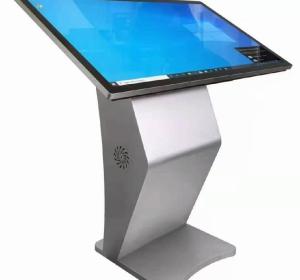
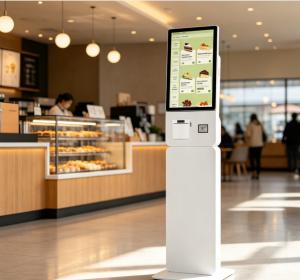
The **Kalash All-in-One Computer** is a versatile and compact computing solution that integrates the CPU and monitor into a single unit. It is designed for both home and business environments where space-saving, ease of use, and efficiency are important. While the specifications of the Ka...
The **Kalash All-in-One Computer** is a versatile and compact computing solution that integrates the CPU and monitor into a single unit. It is designed for both home and business environments where space-saving, ease of use, and efficiency are important. While the specifications of the Kalash All-in-One Computer may vary based on the specific model, here are some general features that are typically seen in all-in-one PCs like this one:
### Key Features:
1. **Space-Saving Design**:
- The all-in-one design combines the **monitor** and **computer hardware** into one unit, eliminating the need for a separate tower or CPU case. This helps save desk space and reduces clutter.
2. **Touchscreen (Optional)**:
- Many **all-in-one** computers, including Kalash models, come with **touchscreen functionality**, offering an intuitive user experience, especially in retail, hospitality, or other customer-facing applications.
3. **Sleek and Modern Aesthetic**:
- The **Kalash All-in-One Computer** typically features a **sleek, modern design** with minimalistic bezels, providing a clean and professional look for offices, retail environments, or home offices.
4. **Efficient Performance**:
- These systems are usually powered by **Intel** or **AMD processors**, with a range of options like **i3, i5, or i7** processors, depending on the model. These configurations are suitable for everyday computing tasks like word processing, web browsing, and light multimedia use.
- **RAM** options generally range from **4GB to 8GB** or more, ensuring smooth multitasking.
5. **Integrated Graphics**:
- Most **all-in-one computers** are equipped with **integrated graphics**, which are sufficient for everyday tasks, multimedia consumption, and light gaming. However, they may not support more demanding gaming or video editing tasks compared to desktop systems with dedicated GPUs.
6. **Storage**:
- Storage options typically include **HDD (Hard Disk Drives)** or **SSD (Solid State Drives)**, with SSD providing faster boot-up times, faster file access, and improved system responsiveness.
- You may find options with **1TB HDD** or **256GB/512GB SSD** for storage, depending on your needs.
7. **Connectivity**:
- The Kalash All-in-One usually offers a variety of **ports** including **USB** ports (USB 2.0 and USB 3.0), an **HDMI port**, **Ethernet port**, and **audio jacks** for connecting peripherals like keyboards, mice, headphones, and printers.
- It also includes **Wi-Fi** and **Bluetooth** connectivity for wireless networking and peripheral connection.
8. **Built-in Speakers**:
- Many all-in-one computers, including Kalash models, feature **built-in stereo speakers**, making it convenient for everyday multimedia tasks without the need for external speakers.
9. **Operating System**:
- The system typically runs on **Windows 10** or **Windows 11**, offering compatibility with a wide range of software applications.
- It can also be used in business environments for tasks like **inventory management**, **point-of-sale (POS)** systems, and general office work.
10. **Webcam**:
- Most all-in-one computers, especially those aimed at business or personal use, come with an **integrated webcam**, making video calls and conferences more convenient.
11. **Touchscreen (Optional)**:
- As mentioned earlier, some Kalash all-in-one PCs come with **touchscreen capabilities**, enhancing interactivity in applications, especially for POS systems, education, and presentations.
### Applications:
- **Business Use**: Ideal for **offices**, **small businesses**, or **POS systems** in retail environments.
- **Home Use**: Suitable for **general computing** such as web browsing, media consumption, and light gaming.
- **Retail and Hospitality**: With optional **touchscreen features**, it can be used as a **point-of-sale (POS) system** in retail or restaurant environments.
- **Education**: Ideal for **classrooms** or **learning environments**, where space is at a premium and ease of use is necessary.
### Advantages:
- **Space-Saving**: The integrated design makes it a great option for environments with limited desk space.
- **Simpler Setup**: The all-in-one design minimizes the need for additional cables and components, simplifying the setup process.
- **Aesthetic**: It offers a modern and clean look that is more aesthetically pleasing than traditional desktop systems.
- **Quiet Operation**: Many all-in-one systems, including Kalash models, are designed for quieter operation, with fewer moving parts compared to traditional desktops.
### Conclusion:
The **Kalash All-in-One Computer** is a versatile and space-efficient solution suitable for small businesses, offices, home use, and retail environments. It offers a modern, compact design with decent performance for everyday computing tasks. While not designed for heavy gaming or high-end video editing, it is perfect for light to moderate use and environments where space-saving is crucial.